

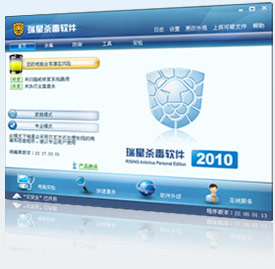
Rising Internet Security 2010 Beta v22.0.1.22
Rising Internet Security 2010 has major innovation regarding intelligent active defense, adding features of home mode for safe accessing disk, system reinforcement white list and system reinforcement:
Safe accessing disk
Prohibit explorer.exe accessing autorun.inf in the USB disk to prevent USB disk from automatically activating virus process. You can check the checkbox [Safe Accessing Disk] in the system reinforcement settings page to realize protection and control to disk access.
System Reinforcement White List
You can customize the white list in the system reinforcement function under computer protection. The applications added to system reinforcement white list will not be limited by intelligent active defense, satisfying your individual requirements.
Home Mode of System Reinforcement
When you select home mode in the system reinforcement settings page, Rising will process pop-up in the home mode according to default strategy to minimize interference to your normal use of computer.
Application Reinforcement
The function can reinforce the specified applications. You can manually add rules for programs required to be reinforced to realize reinforcement protection for applications. When application reinforced is activated, Rising will monitor its abnormal behavior, such as the word.exe should not execute operation of activating rundll.exe. If the program is found with abnormal behavior, Rising will block the behavior by default, and prompt you to note this abnormal condition.
Additionally, when Rinsing is installed for the first time, it will automatically scan programs that can be reinforced in you computer system, and reinforce them automatically.
Embedded Email Monitor
In the version 2010, we add and enhance OUTLOOK monitor in the Email monitor function, so that you can unify Email monitor and management.
Malicious Behavior Detection
The function can check dangerous behavior of the process. When a process is found with dangerous behavior, Rinsing will prompt. You can check the checkbox [Enable Dangerous Action Analysis] in the Trojan behavior defense settings page of the computer protection, to prevent malicious attacks from the process. Additionally, you can manually add [Behavior Analysis White list] in the Trojan behavior defense setting page. The rules added to white list will not be limited by intelligent active defense.
Safe accessing disk
Prohibit explorer.exe accessing autorun.inf in the USB disk to prevent USB disk from automatically activating virus process. You can check the checkbox [Safe Accessing Disk] in the system reinforcement settings page to realize protection and control to disk access.
System Reinforcement White List
You can customize the white list in the system reinforcement function under computer protection. The applications added to system reinforcement white list will not be limited by intelligent active defense, satisfying your individual requirements.
Home Mode of System Reinforcement
When you select home mode in the system reinforcement settings page, Rising will process pop-up in the home mode according to default strategy to minimize interference to your normal use of computer.
Application Reinforcement
The function can reinforce the specified applications. You can manually add rules for programs required to be reinforced to realize reinforcement protection for applications. When application reinforced is activated, Rising will monitor its abnormal behavior, such as the word.exe should not execute operation of activating rundll.exe. If the program is found with abnormal behavior, Rising will block the behavior by default, and prompt you to note this abnormal condition.
Additionally, when Rinsing is installed for the first time, it will automatically scan programs that can be reinforced in you computer system, and reinforce them automatically.
Embedded Email Monitor
In the version 2010, we add and enhance OUTLOOK monitor in the Email monitor function, so that you can unify Email monitor and management.
Malicious Behavior Detection
The function can check dangerous behavior of the process. When a process is found with dangerous behavior, Rinsing will prompt. You can check the checkbox [Enable Dangerous Action Analysis] in the Trojan behavior defense settings page of the computer protection, to prevent malicious attacks from the process. Additionally, you can manually add [Behavior Analysis White list] in the Trojan behavior defense setting page. The rules added to white list will not be limited by intelligent active defense.
OS: Windows 2000/XP/2003/Vista/64 Bit
No-Vista :
CPU : P111 500 MHz or higher
RAM: 64 MB or above
Display: Standard VGA,24-bit true color Vista:
CPU: 1 GHz 32 bit or 64 bit
RAM: 512 MB or above
Display: Standard VGA,24-bit true color
Vista:
CPU: 1 GHz 32 bit or 64 bit
RAM: 512 MB or above
Display: Standard VGA,24-bit true color
Languages: English ,Russian,Turkish,German and Traditional Chinese.
 HOMEPAGE
![[Image]](http://softvnn.com/images/down.gif "[Image]") Download Rising Free Antivirus Download Rising Internet Security
Download Rising Free Antivirus Download Rising Internet SecurityKey:
Code:
HD41IJ-C892KK-S2IWSF-E4F200 ID:7N2SNC3EPL4N
HU4HRJ-TC96MK-W3IVSF-CKF200 ID:7NDXNV3EGL48
QI3CAT-V9GQRN-7JBTRM-QEE200 ID:7NT1F769XK4E
ESNT31-BJUUPP-AUPKRQ-ISE200 ID:7N4N4Z4XLK4D
4950NK-H79AUU-48UVRM-FWE200 ID:7N1UQ1BYHK4A
IG4JQK-4H166D-15FIR5-JUE200 ID:7N7JCQ3XPK4B
4930NK-H78RUU-48UIRM-9WE200 ID:7NXQPCBY5K46
8ILVN6-I1LDDG-KHAGRK-ACE200 ID:7NKHMYGXQK42
MI0TMS-5KG75M-QDDLS0-1VE200 ID:7AHRR6LPN34G
LDQ5RQ-LAE8MM-DALMRG-9PD200 ID:4HDP6HPCC245
CHHCQG-34CB6C-0QB9SC-12F200 ID:8AKBC27JY54K
J1G31G-TPC0PC-76BBSF-WHF200 ID:8A5AC57JV549
K1FGHV-U0BT4F-N8AKSF-T1F200 ID:8ALWCP7JC54G
LHEG9V-UCBK2F-NBAMSF-S1F200 ID:8A6SCJ7JP548
G1DIHT-T0BCKF-70AGSF-E1F200 ID:8APSCH7JI54E
GHCIQT-T4B4MF-71AISF-D1F200 ID:8A79CG7J354U
K1BGHV-U0AT4F-N8ATSF-P1F200 ID:8ASZCT7J354V
NHB19V-UTAPAF-NFAUSF-MHF200 ID:8A86C97JF54S
NHAH9V-UTAKAF-NFAVSF-N1F200 ID:8ATWC47JF545
8H9EQP-24ABME-0HAQSC-92F200 ID:8AWRC47JD548
Q0TM0T-M875G7-5I9ISF-SGF200 ID:8AVTA97J7546
C0HTGG-S04F44-6P98SD-21F200 ID:8ALJ1K7JT54W
7GS98V-QT6RA7-MF9USC-6HF200 ID:8AXJA17JI54D
40LPGT-Q05E47-6890SC-61F200 ID:8A3E1Z7JH547
5GVP8V-QC7M27-MB9MSC-B1F200 ID:8ASCAQ7JS54T
L3401T-U8Q00F-7AE3SU-JHF200 ID:8AJ9AM7JV542
CJ0TQ0-S4P768-6QEASV-H1F200 ID:8AP5AV7JA54X
PGUMPT-M47DM7-5H9GSF-TGF200 ID:8AUZAB7JQ54A
LHVG9V-UCFK2F-NBBMSF-B1F200 ID:8AP6BI7JH54S
00JRGV-P04VK7-M09CSC-G1F200 ID:8AI71P7JK544
PGT6PT-M471M7-5H9JSF-U0F200 ID:8A9LAE7JW54T
B08F0P-RP23P6-6M8SSD-7HF200 ID:8A1UB37J754S
10MA0V-P85IG7-M297SC-HHF200 ID:8AFP167JW54S
B30F10-RPP3P8-6MEBSV-FHF200 ID:8AQRAW7JZ54B
8J8VQP-R4R7ME-6HERSV-91F200 ID:8A2MA77JR54S
807VGV-R01WK7-MG84SD-41F200 ID:8AB5B67JP54W
0GCRPT-P436M7-618ISC-D1F200 ID:8AT11M7JT54M
G1JIHV-T0CTKF-N0BCSF-G1F200 ID:8A3ICZ7JM54G
QASMRW-EAMUMN-SIUTSD-STF200 ID:8ABAX5QJM54M
PRR62W-V6MHGN-WHUWSD-TCF200 ID:8AC8X3QJ5543
7ARQRV-9RMMEN-IEUVSE-2TF200 ID:8A23XZQJ754J
7AUQRU-9RNEEN-AEUGSE-5TF200 ID:8AEWXPQJT54U
1ATRRR-8AN6MM-I2UISE-TTF200 ID:8A3YXRQJD54H
GHQ2QP-T4E8ME-71BQSF-PHF200 ID:8AXWB67JS54K
GHPIQP-T4E4ME-71BRSF-Q1F200 ID:8AY4BI7JE544
J1P31P-TPE0PE-76BSSF-NHF200 ID:8AZVBH7JZ54F
G1NIHV-T0DTKF-N0B4SF-K1F200 ID:8AAMC77J454G
HHMI9V-TCDKIF-N3B6SF-J1F200 ID:8ABXCL7J254S
K1LGHT-U0DC4F-78B0SF-61F200 ID:8A2RC17JK54M
DR610M-SEHG85-MSVUS2-P9E200 ID:6AA1EU9NWG4A
8JSBKL-I4VRU5-CHF4S2-HQE200 ID:6A8DSAXPLF4P
GRS979-C6MR9R-B1W8SL-LWE200 ID:6AKTR19EHG4Q
s018l6-vp0a59-nm9rsf-kc5200 ID:4azlrc6jga4f
EK72D3-3K1QB8-PU7CRM-F1D200 ID:W2BDX2HW66TI
4P0SFP-H7073V-49RCRQ-K8E200 ID:W2VDSV6M2HX7
0 comments:
Post a Comment